What is a COLMAP camera model?
A camera model is the formula COLMAP uses to turn a 3D point into a pixel. The COLMAP camera documentation describes three steps for every perspective model: divide by depth to get a point on the normalized image plane, apply the lens distortion, then scale by the focal length and add the principal point.
The default, SIMPLE_RADIAL, has the parameters f, cx, cy, k. A point (X, Y, Z) becomes u = X / Z, v = Y / Z. With r² = u² + v², distortion gives u' = u (1 + k r²), and the pixel is x = f u' + cx. A negative k pulls the edges inward, which is barrel distortion.
COLMAP puts pixel (0, 0) at the top-left corner, so a centered principal point is exactly half the width and height.
All COLMAP camera models, IDs and parameters
The complete list from COLMAP 4.2.1 (September 29, 2026), taken from src/colmap/sensor/models.h. The ID is what cameras.bin stores; the name is what you pass to --ImageReader.camera_model.
| Model | ID | Parameters in order | When to use it |
|---|---|---|---|
SIMPLE_PINHOLE | 0 | f, cx, cy | Undistorted images, one focal length |
PINHOLE | 1 | fx, fy, cx, cy | Undistorted images. What image_undistorter writes |
SIMPLE_RADIAL | 2 | f, cx, cy, k | The default. Unknown lens, most phone and camera footage |
RADIAL | 3 | f, cx, cy, k1, k2 | A second radial term for wider lenses |
OPENCV | 4 | fx, fy, cx, cy, k1, k2, p1, p2 | Wide lenses with moderate distortion, OpenCV calibrations |
OPENCV_FISHEYE | 5 | fx, fy, cx, cy, k1, k2, k3, k4 | Fisheye lenses. Same as OpenCV's fisheye model |
FULL_OPENCV | 6 | fx, fy, cx, cy, k1, k2, p1, p2, k3, k4, k5, k6 | Complex distortion with many frames, or a known 8-coefficient calibration |
FOV | 7 | fx, fy, cx, cy, omega | Google Project Tango style wide angle. Never start omega at 0 |
SIMPLE_RADIAL_FISHEYE | 8 | f, cx, cy, k | Fisheye with one term, a safe first attempt |
RADIAL_FISHEYE | 9 | f, cx, cy, k1, k2 | Fisheye with two terms |
THIN_PRISM_FISHEYE | 10 | fx, fy, cx, cy, k1, k2, p1, p2, k3, k4, sx1, sy1 | Fisheye with tangential and thin-prism terms |
RAD_TAN_THIN_PRISM_FISHEYE | 11 | fx, fy, cx, cy, k0, k1, k2, k3, k4, k5, p0, p1, s0, s1, s2, s3 | Project Aria and other high-precision fisheye calibrations |
SIMPLE_DIVISION | 12 | f, cx, cy, k | Division model, best with a known calibration. 4.0+ |
DIVISION | 13 | fx, fy, cx, cy, k | The same with two focal lengths. 4.0+ |
SIMPLE_FISHEYE | 14 | f, cx, cy | Equidistant fisheye without distortion terms. 4.0+ |
FISHEYE | 15 | fx, fy, cx, cy | The same with two focal lengths. 4.0+ |
EUCM | 16 | fx, fy, cx, cy, alpha, beta | Very wide fisheye and mirror cameras. 4.1+ |
EQUIRECTANGULAR | 17 | w, h | 360 degree panoramas, no focal length. 4.1+ |
What do the k, p and s parameters mean?
Radial (k) terms bend the image symmetrically around the optical center, so straight lines bow outward (barrel) or inward (pincushion), more strongly toward the edges. k1 scales r², k2 scales r⁴. One or two radial terms describe most lenses, which is why SIMPLE_RADIAL and RADIAL cover so much footage. FULL_OPENCV puts k4 to k6 in a denominator, so it can fit stronger curves.
Tangential (p) terms describe a lens whose elements are not perfectly centered, which pushes the image asymmetrically. In OPENCV the x shift is 2 p1 u v + p2 (r² + 2 u²), exactly as in OpenCV. They are usually small and only worth solving with many frames.
Thin prism (s) terms model a slightly tilted lens or sensor: a shift in a fixed direction that grows with r². THIN_PRISM_FISHEYE has sx1 and sy1. RAD_TAN_THIN_PRISM_FISHEYE has four: s0 r² + s1 r⁴ in x and s2 r² + s3 r⁴ in y.
The fisheye theta model. A pinhole maps a ray at angle theta from the optical axis to a radius proportional to tan(theta), which races to infinity at 90 degrees. No amount of radial distortion fixes that for a 150 or 180 degree lens. The fisheye models use an equidistant projection instead, radius proportional to theta, and apply the polynomial to theta: OPENCV_FISHEYE uses theta (1 + k1 theta² + k2 theta⁴ + k3 theta⁶ + k4 theta⁸), the same as OpenCV.
Which COLMAP camera model should you use?
The COLMAP docs put it simply: use the simplest model that is complex enough for your lens.
- Phone main camera:
SIMPLE_RADIAL, orRADIALif lines near the edges still bend. Ultra-wide phone cameras usually needRADIALorOPENCV. - DSLR, mirrorless and cinema lenses:
SIMPLE_RADIALorRADIAL,OPENCVfor wide primes or a known calibration. COLMAP has no anamorphic model, so desqueeze first. - Action cameras in a wide mode:
OPENCV_FISHEYEorRADIAL_FISHEYE. In a distortion-corrected mode, treat it as a normal wide lens. - Fisheye lenses:
SIMPLE_RADIAL_FISHEYEorOPENCV_FISHEYE. The FAQ recommends fisheye models above about 120 degrees. - 360 cameras:
EQUIRECTANGULARin COLMAP 4.1+. - Already undistorted frames:
PINHOLE.
What happens if you pick the wrong camera model?
The COLMAP docs name the signs: grossly wrong focal lengths or distortion values point to a model that is too complex, while many repeated bundle adjustments point to one that is too simple.
- Too simple: features near the edges keep a high error, the focal length drifts to compensate, and CG slides near the edges even when the average error looks fine.
- Too complex: with few frames or little parallax, extra parameters fit noise. You get absurd focal lengths, wild distortion or a broken reconstruction.
- Perspective model on a fisheye: the outer image cannot be described. Expect few registered frames.
In Blender these all look like sliding. See fixing a high solve error for other causes.
Should every frame get its own camera?
For video from one camera with a fixed lens, no. Pass --ImageReader.single_camera 1 during feature extraction so all frames share one set of intrinsics. One camera solved from hundreds of frames is far more stable, and the docs warn that estimating OPENCV parameters will most likely fail when every image has its own calibration.
A zoom is the exception: when the focal length changes, frames need their own intrinsics. Keep the model simple then, because every frame solves its own parameters.
How to set a known calibration in COLMAP
- 1 Choose the matching model
OPENCVfor OpenCV'sk1, k2, p1, p2,FULL_OPENCVfor the 8-coefficient rational model,OPENCV_FISHEYEforcv::fisheye. - 2 Shift the principal point
OpenCV measures from pixel centers, COLMAP from pixel corners. Add 0.5 to
cxandcy, per the COLMAP FAQ. Focal lengths and coefficients stay the same. - 3 Pass the parameters
Add
--ImageReader.single_camera 1 --ImageReader.camera_model OPENCV --ImageReader.camera_params "fx,fy,cx,cy,k1,k2,p1,p2"tofeature_extractor. In the GUI:Processing > Feature extraction > Custom parameters. - 4 Decide whether to refine
COLMAP still refines intrinsics by default. To keep a trusted calibration fixed, turn off the matching
refine_*bundle adjustment options.
To read solved values, run colmap model_converter --input_path sparse/0 --output_path sparse_txt --output_type TXT. Each line of cameras.txt lists camera ID, model, width, height and the parameters in order.
How to convert COLMAP camera models to OpenCV, Blender and STMaps
| COLMAP model | OpenCV | Blender |
|---|---|---|
SIMPLE_RADIAL, RADIAL | Camera matrix plus k1 (and k2) | Polynomial model, K1 (and K2) copy across |
OPENCV | Camera matrix plus (k1, k2, p1, p2) | K1 and K2 copy across. Check tangential terms, or use an STMap |
FULL_OPENCV | Rational model, (k1, k2, p1, p2, k3, k4, k5, k6) | No equivalent. Undistort or use an STMap |
OPENCV_FISHEYE | cv::fisheye, D = (k1, k2, k3, k4) | No equivalent. Undistort or use an STMap |
| Any other model | No direct equivalent | Undistort or use an STMap |
Blender cameras are perfect pinholes. Focal length converts with focal mm = focal px × sensor width / image width, so 1,600 px on a 1,920 px wide frame with a 36 mm sensor width is 30 mm. Radial terms carry over because Blender's Polynomial model uses the same normalized formula, but tangential conventions differ, so anything more complex is safer as an undistorted plate. COLMAP's image_undistorter writes undistorted frames and a PINHOLE camera that Blender matches exactly.
STMaps store the distortion as an image: each pixel holds the normalized coordinate to sample from. They work for every model in the table, fisheye and thin-prism included, and every compositor can apply them. For OpenCV-style models, cv2.initUndistortRectifyMap gives you the maps; divide by width and height and flip the vertical axis. Using them in Blender and Nuke is covered in lens distortion in Blender.
When was RAD_TAN_THIN_PRISM_FISHEYE added to COLMAP?
In COLMAP 3.11.0, released November 28, 2024. The changelog lists it as a new camera model in support of Meta's Project Aria devices, from pull request 2786 ("Implementation of Aria Fisheye camera model"), merged September 23, 2024. The source links to Aria's FisheyeRadTanThinPrism model, also called Fisheye624, which Aria uses for its SLAM and RGB cameras.
Its 16 parameters are fx, fy, cx, cy, six radial terms k0 to k5 on theta, two tangential terms p0, p1 and four thin-prism terms s0 to s3. Use it for an Aria recording or a factory calibration in that format; for ordinary fisheye footage, OPENCV_FISHEYE is easier to solve.
| COLMAP version | Camera models added |
|---|---|
| 3.11.0 (November 2024) | RAD_TAN_THIN_PRISM_FISHEYE (ID 11) |
| 4.0.0 (March 2026) | SIMPLE_DIVISION, DIVISION, SIMPLE_FISHEYE, FISHEYE (IDs 12 to 15) |
| 4.1.0 (June 2026) | EUCM, EQUIRECTANGULAR (IDs 16 and 17) |
Camera models in MotionMaster 3D
MotionMaster 3D's Heavy Tracking runs COLMAP and GLOMAP inside Blender and solves the lens with SIMPLE_RADIAL by default. Max adds the Lens Distortion / STMap section, where you pick any of 12 models, IDs 0 to 11 from SIMPLE_PINHOLE to RAD_TAN_THIN_PRISM_FISHEYE. Leave it on Auto, or tick Use Known Camera Params to enter a calibration in the order the panel shows.
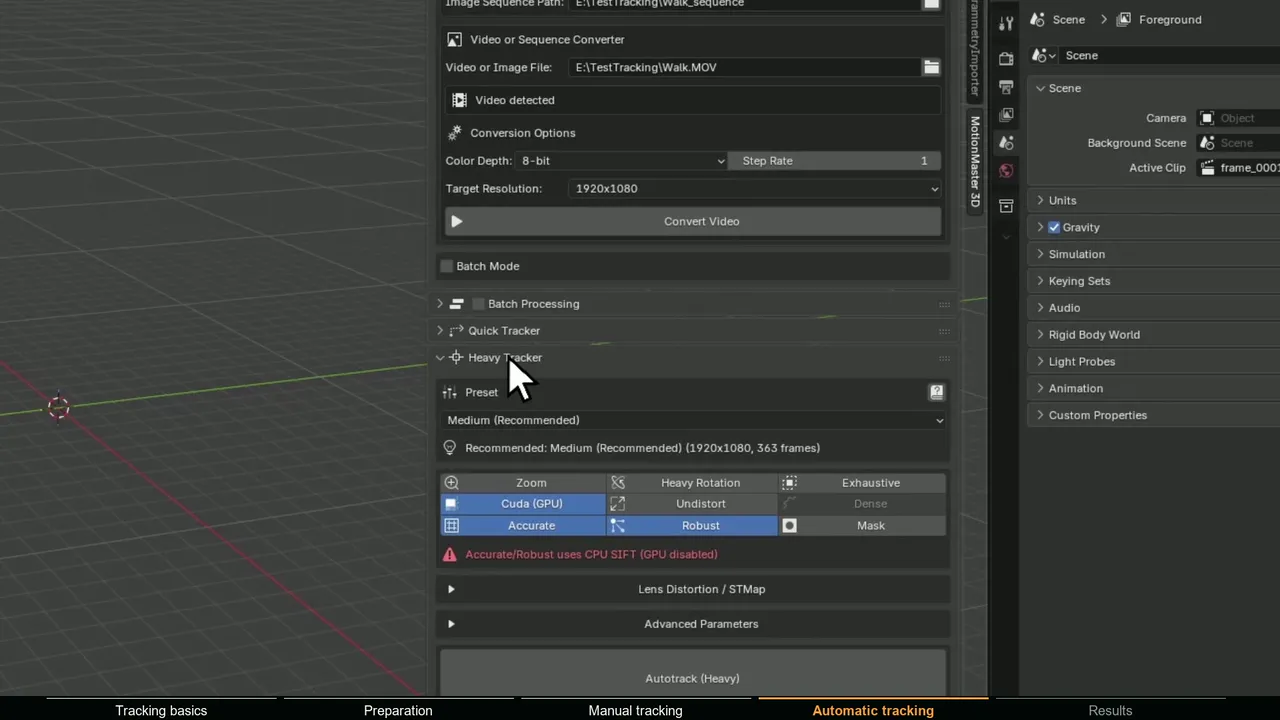
After the solve, Export Calibration writes lens_calibration.json with the model, the parameters in exact COLMAP order and the frame-to-camera map zoom shots need, and Export STMaps writes 32-bit undistort and redistort maps. Details are on lens calibration and STMaps and COLMAP, GLOMAP and OpenMVS in Blender.